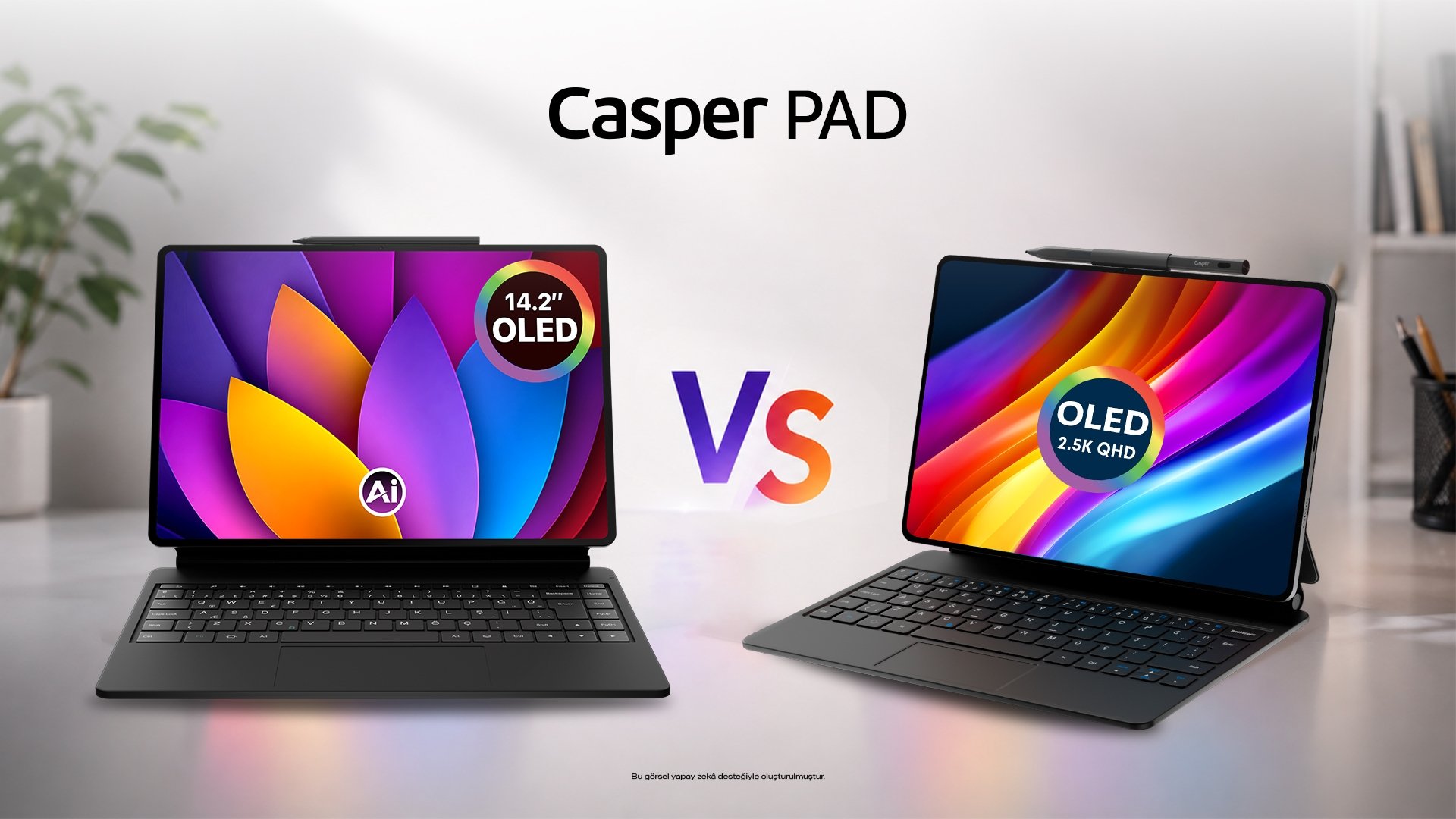
A tablet for everyday work should match the tasks you actually complete, the applications you rely on and the way you carry your device. Casper PAD H10 Pro and Casper PAD Z10 Pro offer different screen sizes and accessory options for readers, writers and people who want a portable workspace. The right choice starts with a workflow rather than a specification list. Reading a report, annotating a document and writing a long response place different demands on the screen and input method. This guide explains how to assess those demands and where a tablet can fit alongside an existing computer.
Write down the steps in a typical session. You might open a report, highlight a passage, check a related document and send a response. Each step identifies a requirement: readable text, a suitable annotation tool, access to files and an efficient way to type. A tablet that looks appealing for one of those steps may need an accessory or a different application for the next.
Separate essential tasks from occasional ones. If you mainly read and review documents, screen layout may matter more than extended typing. If you regularly write several pages, keyboard comfort becomes a practical priority. This distinction helps you assess a device without assuming that every feature contributes equally. It also makes comparisons more useful, because each specification is connected to something you will actually do.
Casper PAD H10 Pro has a 12.6-inch OLED display, while Casper PAD Z10 Pro uses a 14.2-inch OLED display. Their different sizes and aspect ratios give you two ways to approach a portable reading and writing area. A larger display can provide more room for content, but the physical size also affects how the device fits on a small table or in your bag.
Open a document similar to the ones you use and check the text at a comfortable viewing size. Look at page navigation, portrait orientation and the amount of zooming required. If you want two applications on screen, check whether those particular applications support the layout you need. Display size does not automatically make every app suitable for side-by-side work. Your files and software should be part of the comparison.
A pen can be useful for marking a passage or making a quick handwritten note. A keyboard can suit longer responses and document editing. Decide how often you use each method before comparing packages. Casper PAD H10 Pro should be checked against the exact pen and keyboard package being purchased. Casper PAD Z10 Pro lists a Prestige Pen and Magic Keyboard in its box contents; verify the current retail package before ordering.
Accessory compatibility and accessory inclusion are separate questions. Check the keyboard layout, the support position and the charging needs of the input devices. These details can affect a working session even when the tablet itself has enough power and storage. If you move between a desk and a meeting room, consider the complete kit rather than the tablet alone. The combined size and weight determine what you will carry.
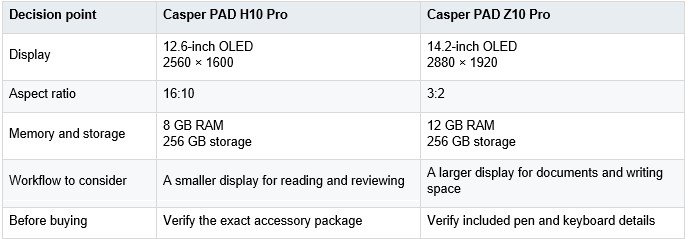
Workflow suggestions are interpretations of the listed specifications, rather than measured productivity comparisons. Confirm the exact product package and application support.
Check the software before replacing a computer
A keyboard can make a tablet easier to type on, but it does not turn the device into a Windows computer. Check the tablet version of every essential application and the functions you depend on. A browser-based service may suit your work, while a specialist desktop application may still require your existing computer. The distinction should be settled before you decide whether a tablet will be your main device.
Test a real file from your workflow. Open it, make a change and export it in the format you need. Then check the exported file on the device used by the recipient. This reveals practical details that a screen specification cannot answer, such as layout preservation or access to a required editing function. A tablet can be a useful companion for reviewing and communicating even when it does not replace your full desktop workflow.
Think about where your documents live and how you reach them. Files stored locally, in a shared workspace or in a cloud account may behave differently when the connection changes. Download the documents you need before a session without reliable access and check that the chosen app allows the required offline actions. Opening a file once does not always mean it remains available offline.
Also decide where the edited version will be saved. If several devices are involved, a clear naming and sync routine can help you avoid using an older copy. This is a working habit rather than a hardware feature. The Casper PAD models can be assessed as part of that routine, with application support and connectivity checked against the places where you intend to use them.
A portable workspace includes the tablet, accessories and any charging equipment you need. A device that is comfortable on a desk may feel different when held for reading. Try both positions if possible. Consider the space available in meeting rooms, shared tables and other places where you work. The best size is the one that fits those situations while keeping your documents readable.
Battery capacity is not a promise of a fixed number of working hours. Brightness, applications, connections and accessory use can change the experience. Plan around your actual sessions and charging opportunities. If the pen or keyboard needs charging separately, include it in the routine. Preparing the whole kit makes portability more useful than looking at the tablet battery in isolation.
Consider Casper PAD H10 Pro when you want a smaller OLED reading and review area with the appropriate input accessories. Consider Casper PAD Z10 Pro when a larger document surface is your priority. In either case, decide whether the tablet will handle complete work sessions or selected tasks alongside a computer. Confirm applications, file exchange and the retail package before buying. A clearly defined role makes the device easier to assess and helps you invest in the screen and tools that support the work you actually do.
A keyboard tablet can handle many reading, communication and document-review tasks, but it cannot automatically replace every laptop application. The deciding factor is software compatibility. List the programs and features you use, then test an actual file on the tablet. Check editing, exporting and sharing before choosing it as your main device. A keyboard improves typing, while application support remains a separate requirement.
Consider the documents you read, how often you use two applications together and where you carry the device. A larger display may provide more room for text and annotation, but it also takes up more space on a desk or in a bag. Open your own files at a comfortable viewing size and check whether the apps support the layout you need.
Accessory compatibility and box contents are different questions. The Casper PAD Z10 Pro product information lists a Prestige Pen and Magic Keyboard, while the exact H10 Pro retail package should be checked before purchase. Review the product code, keyboard layout, charging requirements and included accessories. This helps you understand the total cost and the complete kit you will carry between work locations.
Choose a representative document and open it in the tablet application you plan to use. Make a small edit, save or export it and then open the result on the recipient’s device. Look for changes in layout, missing features and unsupported formats. Also check whether files stored in a shared workspace remain available when you are offline. Real-file testing is more informative than specifications alone.
Think about the tablet, keyboard, pen and charger as one portable kit. Test how the device feels when held for reading and when placed on a small table for typing. Battery capacity alone does not guarantee a fixed working time, because brightness, applications and connectivity affect consumption. Plan charging opportunities around your actual work sessions and verify whether accessories need separate charging.